
Security
How we protect your data and the connections between your systems.
Weavee is the layer that keeps your systems connected and running. That's why security isn't an add-on: it's part of the design. Every connection Weavee operates handles your business data and credentials, and we protect them with industry standards at every stage, from authentication to storage. We also monitor integrations in real time to detect and report issues early and minimize the impact on your operation.
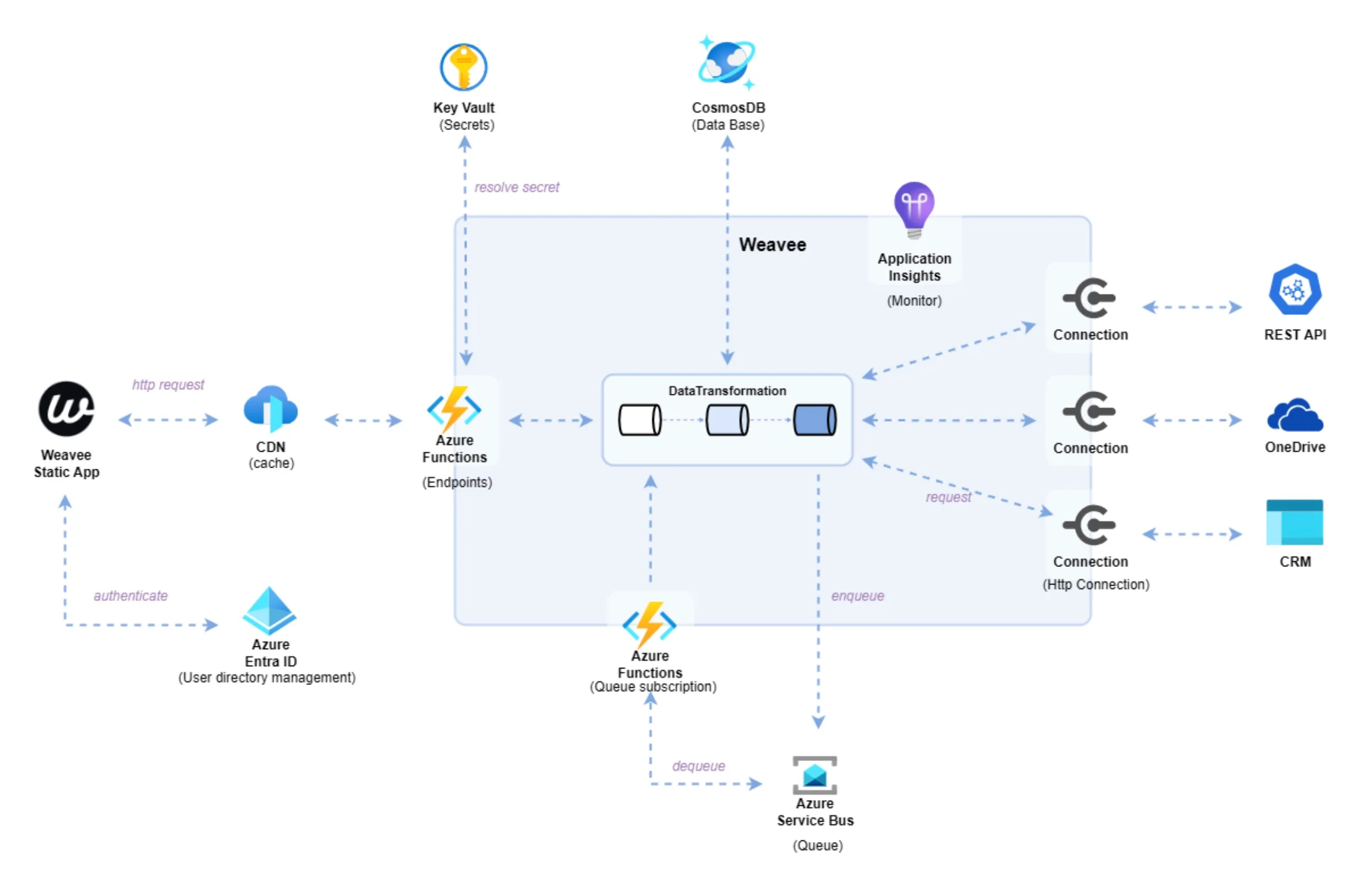
Infrastructure on Azure
Weavee runs on Microsoft Azure. The services that make up the platform are organized and managed within a single resource group, which enables centralized management and the consistent application of security policies across the platform.
Encryption in transit
Communication between Weavee's admin interface and the backend uses the HTTPS protocol (Hypertext Transfer Protocol Secure), which encrypts the data transmitted between both components.
Identity and access
We manage authentication and authorization with Azure Entra ID, a cloud-based identity service that administers users and access securely and centrally. Its features include:
- Multi-factor authentication (MFA): access requires verifying identity through two methods, which significantly reduces the risk of unauthorized access.
- OAuth 2.0 and OpenID Connect: we use these standard protocols to ensure secure authentication without directly exposing user credentials.
Data encryption
Platform data is stored in Azure Cosmos DB, a globally distributed database designed for scalability and high availability. Its security measures include:
- Encryption at rest and in transit: all stored data is encrypted with AES-256, and data in transit between client and server is encrypted with TLS/SSL.
Secrets management
Cryptographic keys, secrets and certificates are managed with Azure Key Vault, which allows sensitive data such as passwords and API tokens to be stored and accessed securely.
We use Key Vault to protect the credentials of the connections that run during workflows. For example, when an integration communicates with an API that requires a username and password, those values are stored as secrets in Key Vault and only the platform can access them to run the communication.
